How Behavioral Analytics Tools Transform Visitors Into Customers

Understanding how visitors actually interact with your website separates guessing from knowing what drives conversions. Behavioral analytics tools track mouse movements, clicks, scrolling patterns, and navigation paths to reveal where users struggle, what captures attention, and why potential customers abandon their journey before converting.
These tools fall into three categories that work together to complete your conversion optimization strategy. Session replay software records individual user experiences, allowing you to watch exactly how people navigate your site and identify friction points. Heatmap tools aggregate thousands of interactions into visual representations showing click patterns, scroll depth, and attention zones. Form analytics platforms pinpoint which fields cause abandonment and where users hesitate during checkout or signup processes.
The practical impact shows in measurable results. When you identify that 60% of users never scroll past your homepage fold, you know to relocate your call-to-action. When replays reveal users clicking non-clickable elements, you understand navigation confusion. When form analytics expose a specific field causing 40% drop-off, you can test removing or simplifying it.
Implementing these tools transforms subjective opinions about website performance into concrete data that guides optimization decisions, reduces bounce rates, and increases conversion rates through evidence-based changes rather than assumptions.
What Behavioral Analytics Tools Actually Tell You
Behavioral analytics tools track the actual interactions users have with your website—every click, scroll, mouse movement, and even moments of frustration like rage clicks. Think of these tools as your digital observation deck, showing you not just the numbers, but the human behavior behind them.
Here’s the crucial difference: traditional analytics platforms like Google Analytics tell you what happened. They show you page views, bounce rates, and conversion numbers. Behavioral analytics tools reveal why it happened by capturing the user experience in real-time. They answer questions like “Why did visitors abandon the checkout page?” or “What’s confusing users on our landing page?”
These tools capture specific user actions including:
– Click patterns and areas of interest on each page
– Scroll depth to understand how far users read your content
– Mouse movements that indicate attention and hesitation
– Rage clicks where users repeatedly click on elements that don’t respond
– Form field interactions showing where users struggle or drop off
This granular insight directly supports data-driven UX design and conversion rate optimization. Instead of guessing why your conversion rate dropped, you can watch actual session recordings or review heatmaps to identify friction points. When you see 60% of users rage-clicking a non-clickable image, you’ve found a specific problem to fix.
The connection to UX improvements is straightforward: behavioral data shows you exactly where users experience confusion, frustration, or delight. This evidence-based approach eliminates assumptions and lets you prioritize changes that will actually move the needle on conversions. You’re no longer optimizing in the dark—you’re making informed decisions based on real user behavior.

Essential Behavioral Analytics Tools Your Business Needs
Heatmap and Click Tracking Tools
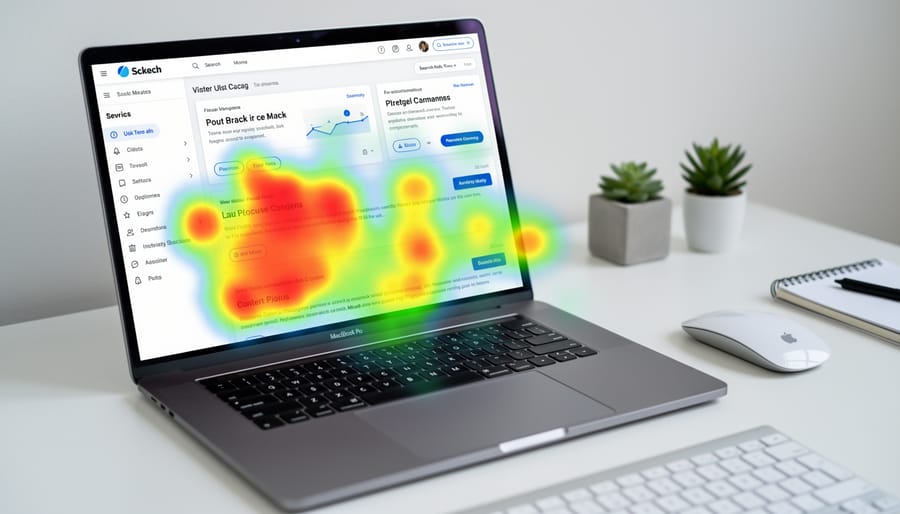
Heatmap and click tracking tools visualize user behavior by showing exactly where visitors look, click, and scroll on your pages. These tools use color-coded overlays—typically ranging from red (hot spots with high activity) to blue (cold zones with minimal engagement)—to reveal patterns you’d otherwise miss in standard analytics reports.
The practical insights from heatmaps can transform your conversion strategy. You might discover dead zones where important content gets ignored, revealing layout problems that push valuable information below the fold. Many businesses find their primary call-to-action buttons receive far fewer clicks than expected, prompting immediate redesigns. Conversely, unexpected click patterns often show users attempting to click non-clickable elements like images or headlines, signaling missed opportunities to add links or interactive features.
Popular tools like Hotjar, Crazy Egg, and Microsoft Clarity automate the data collection process, requiring just a simple code snippet on your site. Within days, you’ll see which page elements drive engagement and which get overlooked. This visual approach makes it easy to communicate findings to your team—no spreadsheets required. For businesses focused on conversion optimization, heatmaps quickly identify friction points in the user journey, allowing you to prioritize changes that directly impact revenue rather than guessing what might work.
Session Recording Software
Session recording software functions like a security camera for your website, capturing real visitor interactions as they navigate your pages. These tools record mouse movements, clicks, scrolls, and form interactions, creating video-like playbacks that reveal exactly how customers experience your site.
The primary advantage is seeing friction points you’d never catch through data alone. You might notice users hovering over non-clickable elements, repeatedly clicking broken buttons, or abandoning forms at specific fields. These insights expose usability issues that conversion rate metrics can only hint at.
For business owners, session recordings eliminate guesswork about why conversions drop. Instead of theorizing about navigation problems, you watch customers struggle in real-time. This perspective is invaluable for prioritizing website improvements and validating design decisions.
Most session recording platforms automate the capture process, requiring minimal setup. You simply install a tracking code and configure which pages to monitor. Many tools also filter recordings by specific behaviors—like rage clicks or error messages—so you can quickly identify problem areas without reviewing hours of footage.
When reviewing sessions, focus on patterns rather than individual cases. If multiple users exhibit the same confusion or hesitation, you’ve identified a genuine optimization opportunity. This approach transforms subjective opinions about your website into objective observations based on actual customer behavior.
Form Analytics Platforms
Form analytics platforms pinpoint exactly where your potential customers give up during the signup or checkout process. These tools track every field interaction, showing you which questions cause hesitation, which fields users skip or revisit, and where they ultimately abandon the form entirely.
The data you’ll collect includes field completion times, error rates, and abandonment points. If users consistently drop off at your phone number field, you know it’s optional information that’s costing you conversions. When people spend excessive time on a particular question, it signals confusion that needs clarification.
Most form analytics platforms offer session replays specifically focused on form interactions, heat maps showing where users click within forms, and automated alerts when abandonment rates spike. You’ll see the percentage of users who start forms versus those who complete them, giving you a clear conversion benchmark to improve.
This directly impacts lead generation because even small improvements compound quickly. Reducing form fields from twelve to eight might boost completions by 20-30%. Fixing a confusing dropdown menu could recover dozens of lost leads weekly. The tools automate the monitoring process, so you’re not manually testing every variation or guessing which fields create friction. You get concrete data about user behavior within your forms, making optimization decisions straightforward and results measurable.
User Feedback and Survey Tools
Behavioral analytics reveal what users do on your site, but they don’t explain why. User feedback and survey tools bridge this gap by capturing direct input from visitors at critical moments in their journey.
These tools let you place targeted surveys at specific touchpoints—after a purchase, when someone abandons their cart, or when they spend extended time on a pricing page. This automated approach means you’re gathering insights without manual outreach, making the process scalable for teams of any size.
Popular options include Hotjar, Qualaroo, and UserReport, which offer on-site widgets that appear based on behavioral triggers. For example, if someone visits your pricing page three times without converting, a micro-survey can ask what’s holding them back. This feedback directly informs your optimization strategy.
The key is keeping surveys short—typically one to three questions—and timing them appropriately. Exit-intent surveys work well for understanding abandonment, while post-purchase surveys reveal what motivated conversions.
When you combine this qualitative data with quantitative behavioral analytics, you gain complete visibility into user actions and motivations. This dual approach eliminates guesswork and enables data-driven decisions that actually resonate with your audience. The result is more targeted optimizations and improved client communication throughout the customer journey.
How to Use Behavioral Data for Targeted CRO
Identify Your Highest-Impact Pages
Not all pages deserve equal attention in your optimization efforts. Start by analyzing your traffic and conversion data to identify pages with the highest potential impact. Look for pages that receive substantial traffic but underperform on conversions—these represent your biggest opportunities for improvement.
Pull metrics from your behavioral analytics tools to create a prioritization matrix. Focus on pages where high visitor volume meets low conversion rates, indicating that you’re attracting the right audience but failing to guide them toward action. A product page with 10,000 monthly visits and a 1% conversion rate offers more improvement potential than a page with 500 visits and a 5% conversion rate.
Pay special attention to pages in critical conversion paths—landing pages, product pages, and checkout flows. Even small improvements here can deliver substantial results. Your analytics should reveal where visitors commonly drop off, helping you pinpoint exactly which pages need immediate attention.
Use automated reporting to track these metrics consistently. Set up regular reports that flag pages falling below your conversion benchmarks, allowing you to address problems quickly. This data-driven approach ensures you’re investing optimization resources where they’ll generate the strongest return, rather than making decisions based on assumptions or personal preferences.

Spot Conversion Blockers
Behavioral analytics reveal specific friction points that prevent visitors from converting. By identifying these patterns, you can systematically remove obstacles and improve your conversion rates.
Rage clicks occur when users frantically click the same element multiple times, signaling frustration with unresponsive buttons or confusing interface elements. Review heatmaps to identify these hotspots, then test whether elements are broken, too small, or simply unclear. Fix by enlarging clickable areas, improving button visibility, or adding loading indicators for slow-responding features.
Dead ends happen when visitors land on pages with no clear next step or call-to-action. Check your exit pages in analytics to find where users hit these walls. Add relevant CTAs, internal navigation options, or related content suggestions to guide visitors forward in their journey.
Form abandonment typically stems from forms that are too long, confusing, or ask for unnecessary information. Track which fields cause drop-offs using form analytics features. Reduce required fields to essential information only, add inline validation to catch errors immediately, and consider breaking lengthy forms into multi-step processes.
Unexpected exits from key pages like pricing or product details often indicate missing information or unclear value propositions. Use session recordings to understand what users review before leaving. Address common questions directly on the page, add trust signals like testimonials or guarantees, and ensure pricing information is transparent and easy to understand. Set up automated alerts to monitor significant changes in these patterns so you can respond quickly when new conversion blockers emerge.
Test and Validate Your Changes
Behavioral data becomes valuable only when you act on it. Start by using your analytics insights to create hypotheses about what changes could improve conversions. For example, if heatmaps show users ignoring your call-to-action button, hypothesize that changing its color, size, or placement will increase clicks.
Implement one change at a time through structured A/B testing to isolate what actually drives results. Run tests for at least two weeks or until you reach statistical significance to ensure reliable data. Track the same behavioral metrics you used initially—click patterns, scroll depth, conversion rates—to measure impact.
Document your results regardless of outcome. Failed tests provide insights just as valuable as successful ones. This iterative approach builds a knowledge base about your audience’s behavior over time. Schedule monthly reviews of your behavioral data to identify new optimization opportunities. Remember, conversion rate optimization is an ongoing process, not a one-time project. Each test cycle refines your understanding and incrementally improves performance.
Automating Behavioral Analytics for Efficiency
Manual data analysis drains valuable time that could be spent on revenue-generating activities. Modern behavioral analytics tools eliminate this bottleneck through intelligent automation that continuously monitors visitor behavior and surfaces actionable insights without requiring constant manual oversight.
Setting up automated tracking begins with defining your key performance indicators. Configure your analytics platform to automatically capture user interactions across critical touchpoints: form submissions, button clicks, page scrolls, and navigation patterns. Most platforms allow you to establish these tracking parameters once, then collect data consistently in the background while you focus on strategic initiatives.
Smart alerts transform passive data collection into proactive decision-making. Configure triggers that notify you when significant behavioral shifts occur, such as sudden drops in checkout completion rates, unusual spikes in page abandonment, or emerging traffic patterns from new sources. These real-time notifications ensure you address issues immediately rather than discovering problems weeks later during quarterly reviews.
Automated reporting schedules deliver regular insights without manual data compilation. Set up weekly or monthly reports that automatically analyze visitor behavior trends, conversion funnel performance, and engagement metrics. These reports arrive in your inbox ready for review, presenting data in digestible formats that facilitate quick strategic decisions.
The efficiency gains compound over time. What previously required hours of spreadsheet manipulation and data cross-referencing now happens automatically. This consistent monitoring catches optimization opportunities early and identifies problems before they significantly impact revenue. Your team shifts from being data collectors to data interpreters, spending more time on client communication and strategic planning rather than manual analysis.
Most importantly, automation ensures no behavioral insight falls through the cracks. Human analysis is subject to availability and attention span, but automated systems never miss a data point, maintaining comprehensive oversight of your digital presence around the clock.
Common Mistakes That Waste Your Analytics Investment
Even the best behavioral analytics tools deliver little value when used incorrectly. Here are the most common pitfalls that waste your investment.
The first mistake is tracking everything without purpose. Many businesses set up comprehensive tracking for every click, scroll, and interaction, only to drown in data they never analyze. Instead, start with specific questions tied to your conversion goals. What pages have the highest exit rates? Where do users abandon your checkout process? Focus your tracking efforts on metrics that directly inform these questions.
Another critical error is ignoring context. A 70% scroll depth might indicate strong engagement on a blog post but signal confusion on a landing page. Similarly, high time-on-page could mean users find your content valuable or they simply can’t locate what they need. Always interpret analytics data within the context of user intent and page purpose.
Making changes without testing is equally problematic. Your analytics might show that users rarely scroll below the fold, but removing content without A/B testing could hurt conversions. Use behavioral data to generate hypotheses, then validate them through controlled experiments before implementing changes site-wide.
Finally, the most expensive mistake is failing to connect analytics insights to business objectives. Tracking user behavior means nothing if it doesn’t influence decisions that impact revenue, customer acquisition costs, or retention rates. Set up automated reports that link behavioral metrics to your key performance indicators, ensuring your team consistently acts on the insights you gather.
Behavioral analytics tools transform how you understand and optimize user behavior on your website. Instead of relying on assumptions about what visitors want, you gain concrete data showing exactly where they click, scroll, and struggle. This insight turns conversion rate optimization from guesswork into a strategic, measurable process.
The key to success is starting small. Choose one or two tools that address your most pressing questions. If you’re unsure why visitors abandon your checkout page, begin with session recordings. If you want to understand which homepage elements attract attention, start with heatmaps. Focus on your high-impact pages first—those that drive the most revenue or conversions.
Build a sustainable optimization process by reviewing analytics data regularly, forming hypotheses based on what you discover, testing changes systematically, and documenting results. This creates a continuous improvement cycle that compounds over time.
The difference between businesses that convert well and those that struggle often comes down to understanding user behavior. These tools give you that understanding. Start implementing behavioral analytics today, even if you begin with free versions, and watch as data-driven decisions replace guesswork and your conversion rates improve.
Leave a Reply